CRM Module
The module CRM from Collabox module provides access to many functions to manage your sales and customers .The opportunity table is the star of the CRM and allows you to track your sales activities in real time. This is your “sales tunnel” that gives you all your business opportunities at a glance.
Opportunity table
Use this powerful board and customizable in which you can “ click and drag »And bring to life your business opportunities linked to amounts in real time, by customer, by product or by service sold.
Here is a fictitious example of an opportunity chart:
Sales funnel
On the main page of your opportunity board, you can directly view your sales funnel. First click on the sales amount to unfold it. Get at a glance the amounts related to the different phases related to your opportunity status.

Customize your opportunity table
Customize all the variables of your opportunity table in your Collabox: colors, expressions, types of products and services sold. A complete, dynamic and motivating tool for all!
Structure your table
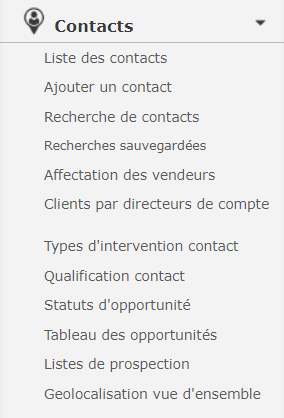
Click in your “Contacts” module in the main menu.

Then access the main functions of the “Contacts” module of your Collabox in the left-hand menu. They allow you to customize your table yourself so that it becomes a powerful tool.
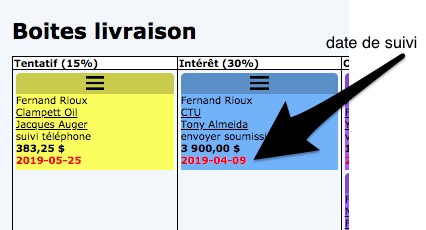
1- Contact and follow-up dates
Access the contact form directly by clicking on the link in the box. Change the follow-up date of your contact by clicking on the link of your contact’s name. It will take you to your contact file where you can modify the information necessary for your follow-up.
2- The qualification of your contact
You can “to qualify” your contact as you wish according to the practices of your company.
For example: Gold, Silver, Bronze


3- The status of opportunities
You can enter the different opportunity statuses according to your sales process.
You indicate the name, the color, the percentage of possibility of closing the mandate according to your tastes, in addition you can do it yourself.
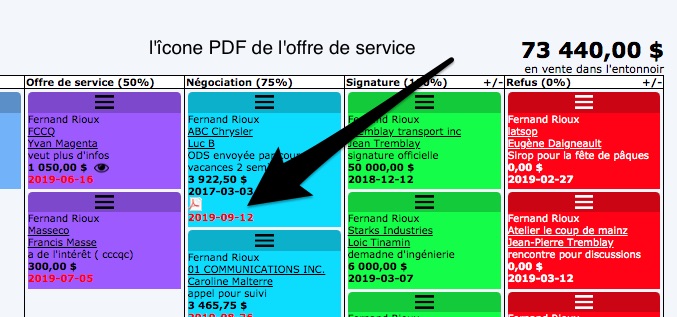
4- Links to your service offers
You can view the service offer (in pdf) which is linked to the opportunity directly in the opportunities table.
5- The products or services of your organization
The opportunities table allows you to consult your “sales funnel” by product or service or for the whole.
In this example, the company Nova has 3 products: Delivery boxes, professional consultation, observation reports.
If you want to see all the opportunities grouped into one table = Check = Combine the products into one table and voila!

Whether you are in professional consultation, in the construction, manufacturing and other sectors, you can establish the directory of all your products or services and even, if necessary, explode the specificities of these. From the simplest to the most detailed according to your needs.
For example, categories, supplier of that product or service, cost and selling price, weight, etc.
To do this you must enter them in the list of your products or services.

You have more questions ? Do you want to subscribe to Collabox CRM?
It’s easy: louise.lahaie@collabox.com or 418 907-9274, ext. 120
Good discoveries and above all good sales!


