Create your service offers in Collabox and assign them a“probability of closing” or a“sales opportunity“. Depending on your needs, you will have access to one or the other of these options.
Probability of closing
When you fill in your service offer, the mandatory “probability of closing” box in the “Info” tab is displayed. This is for information purposes only, to enter a percentage based on the chance of closing or not closing the contract or sale. This gives you control over priority service offerings.

Sales opportunity
Use the Collabox CRM module to change the display from “probability of closing” to “sales opportunity”. The latter consists of a drop-down menu linked to the customizable opportunities of your CRM module.
First, select the desired opportunity status based on the parameters already established by your organization.
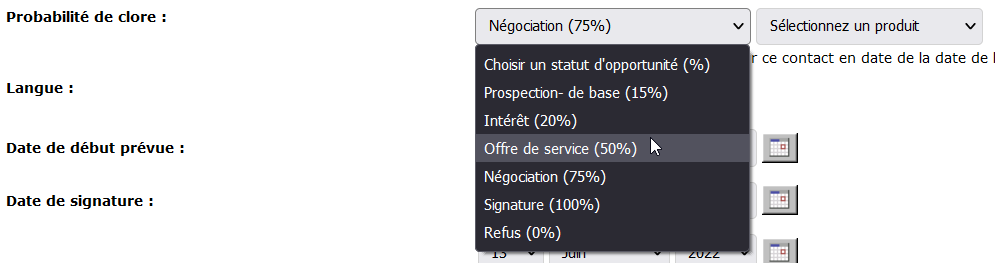
Then, if applicable, select an associated product.
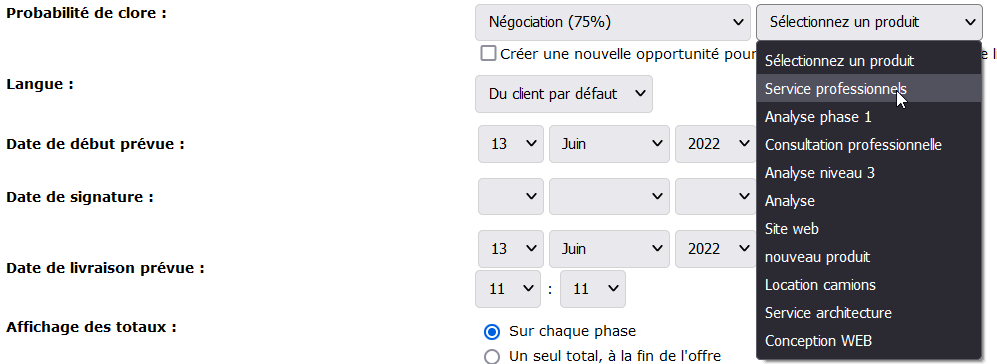
Finally, check or uncheck the small box under the probability percentage to create a customer follow-up in your CRM.

Make sure you have a contact name for the opportunity to be assigned to.

Upon registration, a link to the opportunity will replace the checkbox. Click on it to go to the contact form.

Contact Form
Find the opportunity in the contact form. The tracking date is the delivery date of the service offering (SO). You can see the percentage of close and the name of the ODS. On the right, the amount sold corresponds to the amount of the service offer.



