In your Collabox, there are several HR reports to manage vacation, sickness, vacations, banked “health” hours and regular employee time banks.
These reports are available for managers or for the employee only. Access can be personalized as needed.
HR Reports: Sick Leave
In your top menu, choose the Reports option

Then, from the left-hand menu, select the Health Vacation Report
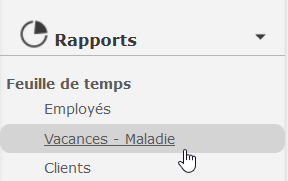
Then, choose a specific time period to display the desired data. You will get the following report.

This HR report is useful to have at a glance the information related to the hours entered by your employees’ timesheets.
Report – Time Bank
The Time Bank report allows you to see all the hours that your employees have put in their time bank through the timesheet.
First, return to the main Reports menu.
Then, in the left-hand menu, selectthe Hour Bank report. You will get the following report.

Watch several tutorials on our Youtube channel and visit our Tips and Tricks section in the Blog to continue your Collabox configuration!
If you have any questions or need help with a configuration, contact us and we will be happy to answer you.
info@collabox.com or 418 907-9274, ext. 120


