The report by employee allows you to calculate and display the overtime hours of your employees. These are usually the hours that exceed 40 hours per week and must be paid at time and a half.
Overtime report
First, go to the “Reports” tab in the main menu at the top of the page.

Then select the “Employees” function from the left-hand menu.
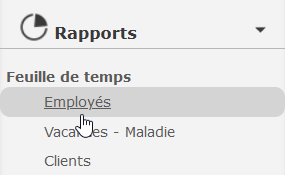
Now that the report options by employee are displayed, choose a time period and an employee’s name. You can also choose not to select any employee to get a detailed report for each person working in your company.
Then, uncheck the boxes “Include hours details” and “Include comments”. Then select the “Explode hours by holiday/holiday” box.

The report result is displayed by employee name. Regular hours are listed, followed by time-and-a-half, vacations and vacations. Other variables are possible depending on your configurations. This way, sick leave or hours on the road could be visible.
With the overtime report, quickly view the hours at time and a half and adjust your next paycheck accordingly!

Watch several video tutorials on our Youtube channel and visit our Tips and Tricks section in the Blog to continue your Collabox configuration!
If you have any questions, please contact us and we will be happy to answer you.
info@collabox.com (418) 907-9274


