Collabox customers who sell products necessarily need to invoice by product as well. Good news, the Collabox billing module allows you to do this.
Configure products
The first step is to configure your products in the Collabox. If you haven’t already done so, please pay close attention to this blog post that guides you through this setup. In short, you need to have entered all the details of each product before you can invoice a customer.
Invoice by product
1. From the project
First, move to a project to bill. To do so, click on the “project list ” function in the left menu of your Collabox.
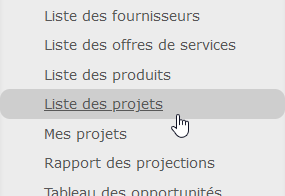
Then select the desired project.

Then go to the “Invoicing” tab. Then, add an invoice

Now review the billing information. Make sure the client name and project title are correct. You can add a product now, if the invoice contains only one, or continue and add them in the next step.

In the invoice form, add as many elements as you wish. Make sure you put a description, choose the right product and add the quantity. The configuration of your products allows Collabox to automatically fill in the fields associated with the amounts.

2. From the Accounting module
There is a second option to bill by product. First go to the “Accounting” module in the main menu.

Then manually add an invoice.
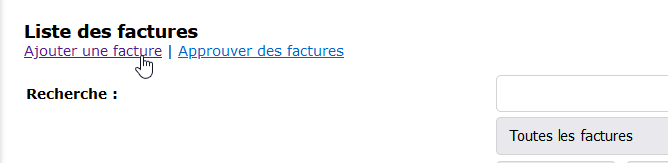
Fill in the options available to you, then select a product to invoice or add them directly to the invoice in the next step.
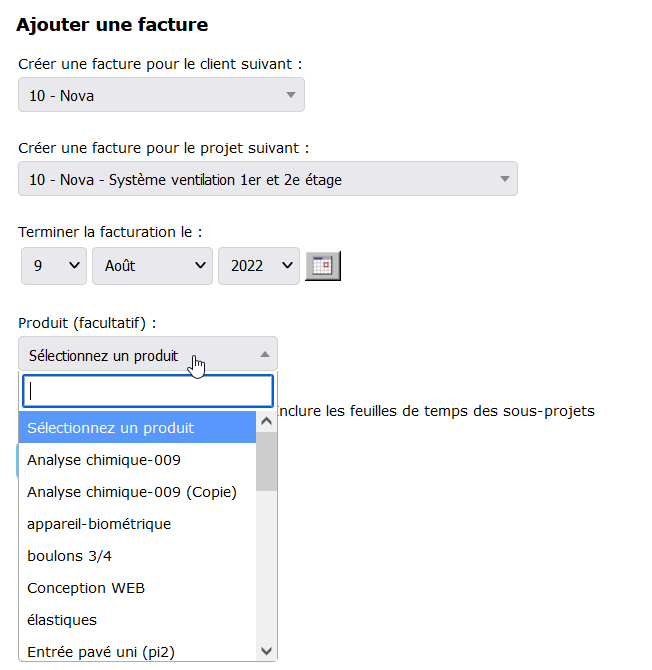
Finally, fill in the quantities and prices manually or add other products as needed.
Now you know how to invoice by product!
Watch several videos on our Youtube channel and visit our Tips and Tricks section in the Blog to continue your Collabox configuration!
If you have any questions, please contact us and we will be happy to answer you.
info@collabox.com (418) 907-9274


