You can allow your employees to print a report without any amount. This option is also useful when you need to send a report to a client. Isn’t discretion often the order of the day?
By default, the amounts are not displayed in the reports produced by your employees. However, if you prefer to allow them to see the amounts worked, here are the steps to do so.
Show amounts in reports
First, visit the Configuration menu in the main navigation bar at the top of your page. Then, click on the -> Employees in the left menu. Then select an employee and consult his personal file. In the tab called “Advanced configuration”, check the option “Show amounts in reports”. Save your work. The report without amount will be transformed and will show all the costs for this employee only.
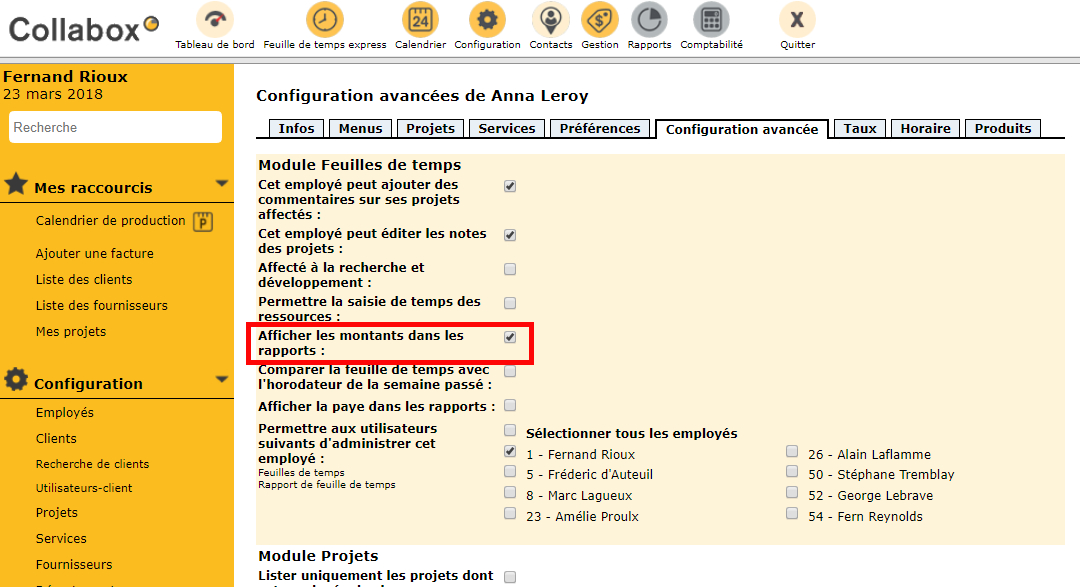
Advanced Configurations page of [nom de l’employé]
Perform this procedure for all employees who need access to the financial aspects of their reports. The maneuver can be reversed at any time should the option be removed.
Watch several videos on our Youtube channel and visit our Tips and Tricks section in the Blog to continue your Collabox configuration!
If you have any questions, please contact us and we will be happy to answer you.
info@collabox.com (418) 907-9274


