You have full control over the financial data your employees can see in Collabox. You are responsible for managing the access rights to this information from your administrator account. There are two places in the setup to change your preferences: the tab Menu and tab C advanced configuration .
To access these menus, click on the icon Configuration in the horizontal menu.

Go to the configuration page Employees .
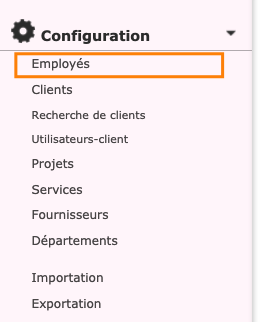
Click on the name of the employee whose access to financial data you wish to modify. You will fall on the page Update an employee . The two tabs that interest you are at the top of this page ( Menu and Advanced configuration ).

Manage access to the module Billing and accounting
Under the tab Menu , you can manage access by module. This is the module Billing and accounting which relates to financial data. You can choose, using the checkboxes, to completely remove access to the module or to remove access to certain parts only.
Show amounts in reports
Under the tab Advanced configuration , you will find, in the module section Timesheets , the option Show amounts in reports . If the corresponding box is unchecked, your employee will no longer see any amount in the reports. This option is also useful when you want to show a report to a client without revealing your finances to them.

Please note: Your privacy preferences will need to be modified for each employee.
Watch several videos on our Youtube channel and visit our Tips and Tricks section in the Documentary Blog to continue using the Collabox!
If you have any questions, please contact us and we will be happy to answer you.
info@collabox.com (418) 907-9274 ext. 120


