The contact list includes a history of e-mail exchanges to save time when you need to track down a conversation or follow up.
How to access exchanged emails
To access the messages exchanged with a contact, first go to his personal file via the “Contacts” module.

Now open the “Sending” tab to find all your exchanges.

You will have all the messages received and sent, separated into two blocks to better find them!


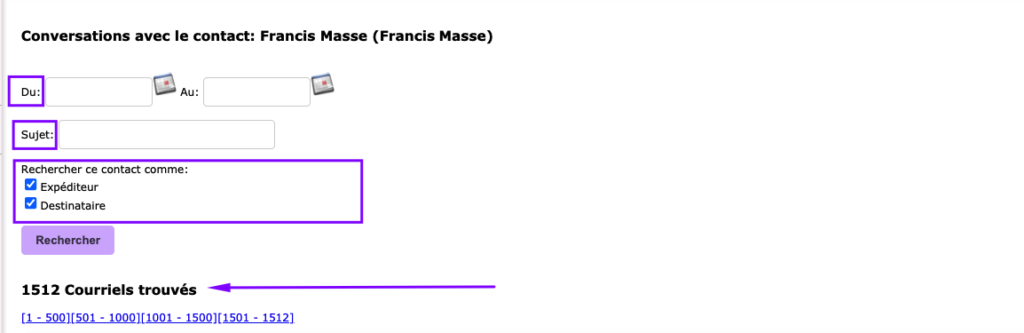
Search tool
You have a search tool that allows you to :
- Filter emails for a given period
- Show only received or sent emails
- Search by subject
Send an email from a message already received or sent
At any time, you can open a received or sent email and resend it easily by clicking directly on the email link. It’s very fast.
Please note that to use all these functions, you’ll need a basic configuration, which we’ll be happy to help you with.
With the Collabox Contacts module, managing your customers, partners, suppliers, colleagues and prospects by email is fast and efficient!
Watch several videos on our Youtube channel and visit our Tips and Tricks section in the Documentary Blog to continue using the Collabox!
If you have any questions, please contact us and we will be happy to answer you.
info@collabox.com (418) 907-9274 ext. 120


