The project tracking report provides real-time information to manage your business, as well as performance indicators. It requires the use of several Collabox ERP functions, such as service offerings, timesheets and billing.
Preliminary checks
To get the “real” numbers for your company, first make sure you have made the following entries for each project in Collabox:
- Service offerings
- Invoices
- Disbursed
Then, check that the following fields are filled in for each project.
Date of the deliverable, in the project sheet.

Type of project according to your company’s personal description, also in the project sheet.

Finally, update the “status” of your projects. Are they in submission or in production? You are now ready to produce your project tracking report.
Produce the project monitoring report
First select the “Reports” menu.

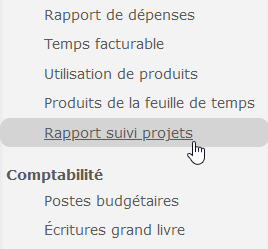
Then, click on the “Project Tracking Report” tab in the left grey menu.
Choose the display options that apply to you. Filter your search by project manager, by project or by project type, according to your needs. Specify a delivery date or transaction dates, if required. Leave the fields blank to get all the projects in one place.

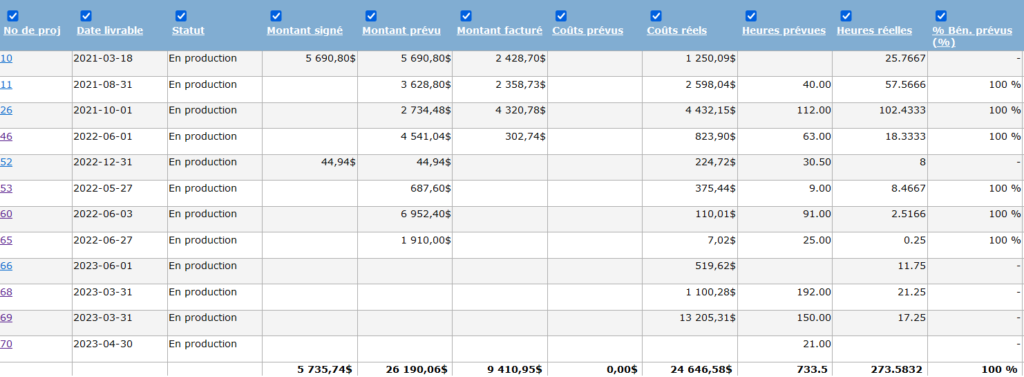
Now, view your report and analyze your results! You can customize the interface by removing certain columns or changing your display choices. The report shows you the status, the signed amount from the service offer, the amount already invoiced to the client, the costs paid for the project, the hours worked, etc.
Description of the fields presented
See that the table produced in the project tracking report is divided by column. Each of them is associated with a particular field. The first fields refer to the context of the project. First, see the client’s name, project number, and name. Then, the name of the project manager is indicated, followed by the project delivery date. Finally, the type of project, according to your company’s specifications, and its completion status are indicated.

The second portion of the table refers to the financial aspect of the project. It shows the signed amount from the service offer, the amount planned for the project. This amount differs from the signed amount if the project has evolved during the course of its implementation. Finally, look at the amount already billed to the customer.
Then, note the costs directly associated with the project based on the disbursements you have added. The hours planned, i.e. the bank of hours indicated in the project sheet, and worked (timesheets) are then displayed, which leads to the percentage of planned and actual profits in relation to the project.

The last portion of the report displays items related to project progress. Progress refers to the percentage of completion handwritten by the employee in the project sheet. In turn, the calculated progress refers to the percentage of the planned money (fees, equipment, product, subcontracting, etc.) that is actually spent based on the information in the service offering. The progress notes are then displayed, followed by the last update date of the project.

Watch several videos on our Youtube channel and visit our Tips and Tricks section in the Blog to continue your Collabox configuration!
If you have any questions, please contact us and we will be happy to answer you.
info@collabox.com (418) 907-9274


